User manual · Requesters
My tickets
How to find the tickets you have submitted and understand their status.
This page shows you how to find a ticket you submitted earlier and what its status means.
Select "My tickets" in the left menu to see every request you have submitted.
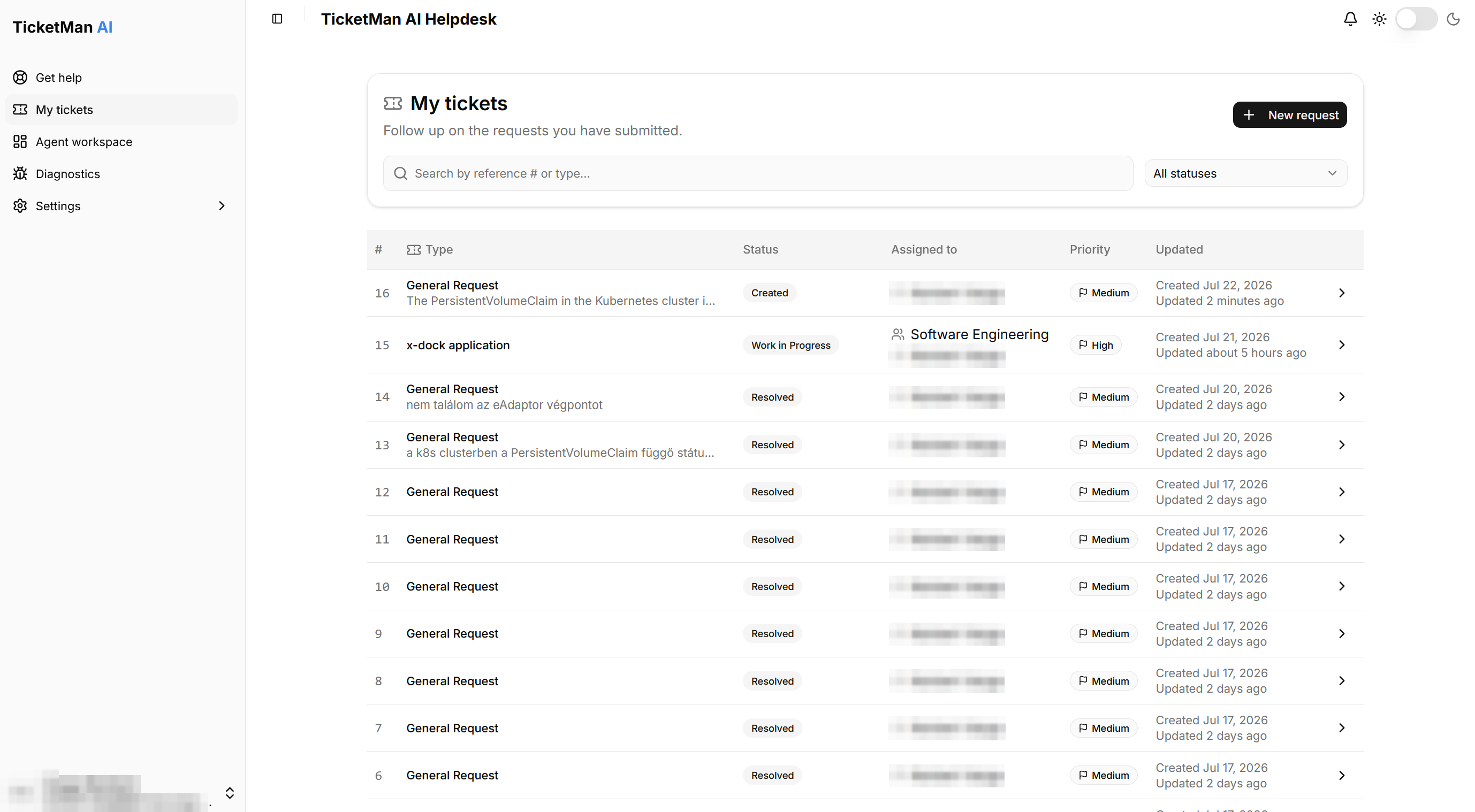
Finding a ticket
- Type into the search box to find a ticket by its reference number or by its topic name.
- Use the status dropdown to show only tickets in a particular status.
- Select a row (or a card, on a small screen) to open that ticket.
If nothing matches your search or filter, TicketMan tells you so and lets you adjust it.
Understanding statuses
Each ticket shows a status badge. The statuses you may see are:
- Created: your request has been received.
- Assigned: your request has been handed to someone.
- Work in Progress: someone is actively working on it.
- Pending: work is paused, waiting on something, for example your response, a scheduled visit, or a part. A more specific reason is often shown next to the status.
- Resolved: your request has been completed. See "Following your ticket" for what you can still do once a ticket reaches this status.
Each row also shows who your request is assigned to, its priority, and when it was created and last updated. If nobody has picked it up yet, you see "Unassigned" instead of a name.
Select "New request" at any time to start another request.